Instructions from the Office of the University Registrar for assigning or removing advisors.
Assign an Advisor
Path.
- Navigate to Student Advisor page.
- Enter the Search Criteria, then select the Search button.
To add an advisor, select the Add a new row at row 1 (plus sign icon) in the Student Academic Details section.
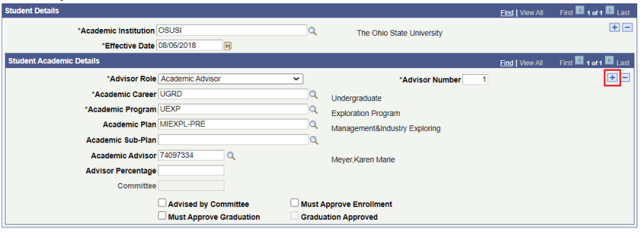
- Complete the following fields, if applicable, on the Student Advisor page.
- Academic Institution (required)
- Effective Date (required)
- Advisor Role (required)
- Advisor Number (required)
- Academic Career (required)
- Academic Program (required)
- Academic Plan
- Academic Subplan
- Academic Advisor (advisor's ID number)
- Advisor Percentage
- Committee
- Select if applicable:
- Advised by Committee
- Must Approve Enrollment
- Must Approve Graduation
- Graduation Approved
- Select the Save button.
Remove an advisor
Advising rows are not deleted, but replaced. To replace the existing advisor, select the Add a new row at row 1 (plus sign icon) in the Student Details section then follow steps 4 and 5 from the Assign an Advisor instructions above.
