Instructions from The Office of the University Registrar to adjust a grading basis.
Path.
- Navigate to the Quick Enrollment page.
- Enter Search Criteria, then select the Add button link to view the Class Enrollment tab.
If enrollment already exists, select Normal Maint as the Action. If enrollment does not exist, add new class enrollment row by selecting the Add a new row at 1 link (plus sign icon) to add enrollment and the grading basis.
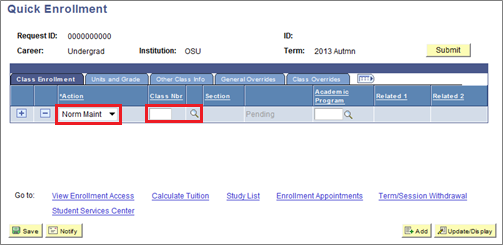
- In the in the Class Nbr field, enter the class number of the class for which you wish to change the grade basis. You may also use the Search link (magnifying glass icon) to select the class.
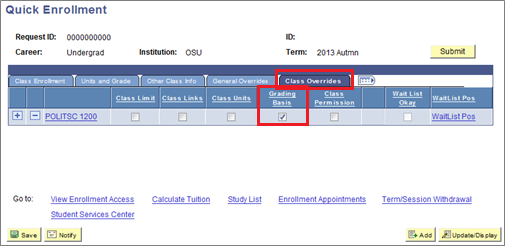
Select the Class Overrides tab to select the Grading Basis checkbox.
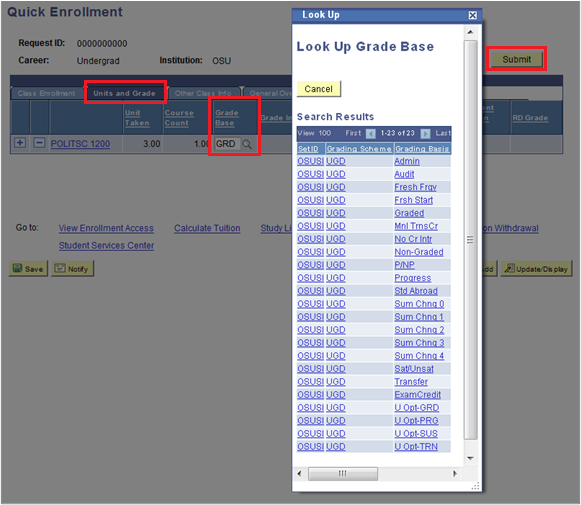
- Select the Units and Grade tab.
- In the Grade Base column, select the Look up Grade Base link (magnifying glass) to open a list of options. Select the desired grading basis.
Select the Submit button link to request the change.
- Success will appear on the Class Enrollment tab when the Grade Basis is updated. Errors will appear if request was not processed; select the Errors link to learn details. If possible, resolve errors to resubmit.