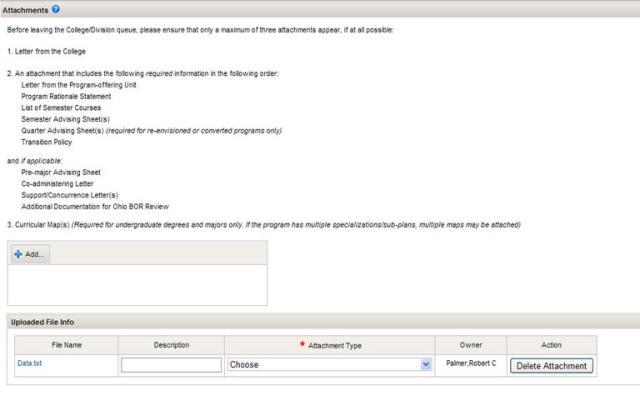
Before leaving the College/Division queue, only a maximum of three attachments should appear, if at all possible:
1. Letter from the College to the Office of Academic Affairs that:
- Summarizes college (and division, if applicable) review processes for programs and courses.
- Describes any college-wide components common to all of the proposed programs.
- Recommends approval.
- Includes signatures from dean and curricular associate dean(s).
- May include Support/Concurrence Letter(s) (if applicable)
- This is to be appended by the college when the college approves the proposal
2. Attachment that includes the following required information in the following order:
- Letter from the Program-Offering Unit (e.g., department, school, center) to the Office of Academic Affairs that:
- Lists all current programs in the department/unit (as identified by the University Registrar):
- Undergraduate bachelors degree programs and/or majors
- Undergraduate minors
- Undergraduate associate degree programs
- Graduate degree programs
- Graduate minors
- Graduate certificate programs
- Graduate interdisciplinary specializations
- Professional degree programs
- Combined programs (e.g., BS/MS, Ph.D./ MD)
- Summarizes unit-level review processes for programs and courses, including input from students and other relevant stakeholders.
- Includes any additional materials required for the college-level program review of programs and courses.
- Recommends approval.
- Includes signature from department/unit chair.
- Lists all current programs in the department/unit (as identified by the University Registrar):
- Program Rationale Statement: A statement for proposed program changes (either significant or minimal) and a description of how the changes will benefit students and enhance program quality. Include date of last significant program revision. If a new program, give rationale.
- List of Semester Courses (department, title, credit hours) and categories of courses that constitute the requirements of the program (If this is a proposal for a graduate program, list any requirements beyond those stipulated by the Graduate School.)
Semester Advising Sheet(s): Curriculum advising sheet of requirements for the program, formatted to meet the unit's standards.
- Quarter Advising Sheet(s) (required for re-envisioned or converted programs only): Curriculum advising sheet of requirements for the program, formatted to meet the unit's standards.
- Transition Policy: A statement that assures those students who began their degree under quarters that the transition to semesters will not delay their graduation nor disrupt progress toward a degree. This may include a description of a preliminary program transition plan, how individual transition advising plans will be developed, and possible use of bridge courses. It should address students in the program and students taking service courses offered by the department/unit.
And, if applicable:
- Pre-Major Advising Sheet: If the program has a pre-major either (1) describe the proposed pre-major requirements which may include prerequisite courses and any minimum grade point of specialized grade point hour requirements in the textbox provided, or (2) attach an advising sheet and note the attachment name.
- Co-Administering Letter: This is only required if the program has a co-administering college, and is to be appended by the college when the college approves the proposal.
- Support/Concurrence Letter(s): If the content of your program includes, in substantive ways, topics and interests related to those in other units you will need to pursue Concurrence from those units. This often takes the form of either a letter from the Dean, Department Chair or Director of the outside unit(s).
Of particular note are course requests which include: computing, computer programming, statistics, leadership development, and the environment.
- Additional Documentation for Ohio Department of Higher Education for new programs or name changes.
3. Curricular Map(s)
(Required for undergraduate degrees and majors only. If the program has multiple specializations/sub-plans, multiple maps may be attached): maps show how, and at what level (e.g., beginning, intermediate, advanced), the program's courses facilitate students' attainment of program learning goals. A table format is recommended (see examples below).
Program Learning Goals
Required Courses (offered by the unit)
| Goal #1 | Goal #2 | Goal #3 | Goal #4, etc | |
|---|---|---|---|---|
| Course 1 | beginning | beginning | ||
| Course 2 | beginning | intermediate | beginning | |
| Course 3 | intermediate | intermediate | intermediate | |
| Course 4 | advanced | intermediate | ||
| Course 5, etc. | advanced | advanced | advanced | advanced |
Required Courses (offered outside of the unit)
| Goal #1 | Goal #2 | Goal #3 | Goal #4, etc. | |
|---|---|---|---|---|
| Course 1 | beginning | beginning | ||
| Course 2, etc. | intermediate |
Elective Courses, Tracks, Categories, or Baskets of Courses (may be offered inside or outside of unit)
| Category 1 | Goal #1 | Goal #2 | Goal #3 | Goal #4, etc. |
|---|---|---|---|---|
| Course 1 under Category 1 | beginning | |||
| Course 2 under Category 1, etc. | intermediate |
| Category 2, etc. | Goal #1 | Goal #2 | Goal #3 | Goal #4, etc. |
|---|---|---|---|---|
| Course 1 under Category 2 | beginning | |||
| Course 2 under Category 2, etc. | intermediate |
General Education Courses
| Goal #1 | Goal #2 | Goal #3 | Goal #4 | |
|---|---|---|---|---|
| General Education courses | beginning |
Adding the Attachments
Attachments of up to 10 MB each can be added to a Program Request to provide additional information.
Click

to add an attachment. Select the correct file, then click

. Acceptable file types are:
- Excel
- Word
- Image files (JPEG, GIF, etc.)
- Text and rich-text files
Uploaded File Information will appear in the Uploaded File Info box. It is suggested that you add a description to your file to easily identify it later. You must select the Attachment Type from the drop-down list.
To delete a file, click

.