
One Email. One Ohio State
How your email will change
For more than a decade, students are issued both a lastname.#@buckeyemail.osu.edu and a lastname.#@osu.edu email addresses. Work completed over the summer and continuing into fall will allow students to use one primary email account to send and receive university communications.
- Your lastname.#@osu.edu address becomes your default login and communication email
- Emails sent to both @osu.edu and @buckeyemail.osu.edu will be delivered to your lastname.#@osu.edu
This change is designed to make your day-to-day easier while strengthening security across Ohio State.
Migration Dates and Groups
You will receive an email about your migration group and the date your account will transition. Make note of your group; any date changes will be noted on this webpage.
List of Migration Groups and Dates
Migrations were completed from June to September
| Group | Date | Group | Date |
|---|---|---|---|
| S22 | Oct. 12 | G34 | Oct. 13 |
Additional guidance for users with multiple affiliations
If you have more than one connection to Ohio State - for example, if you are both a full-time employee and a student - you fall into the category of "multiple affiliations." The steps in this section are only for Groups D##.
Because you have two accounts, some content will look different after the transition. Take these steps to prepare:
- Before your email account transitions, please remove any BuckeyeMail inbox rules that forward messages to another account.
- Avoid making major changes to your Outlook mailbox or OneDrive files (such as moving folders, deleting large amounts of content, or restructuring files).
Migrated email and OneDrive content will appear in subfolders; calendar and task information will be merged. The finalization of your transition may take a few days, during this time items will still be migrating and will eventually show up. You will receive a completion email once all is completed. These guidelines are only for Groups D##.
- Soon you will see new subfolders: BuckeyeMailMigrated, BuckeyeOneDriveMigrated, and BuckeyeMigratedChats. Please do not move, delete, edit, or add anything to those folders until your migration is completed.
- Teams chat history may not fully transfer. Please save anything important ahead of time.
- OneDrive sharing links may need to be reshared.
- Microsoft Forms will not transfer.
- If a folder is empty, it will not be transferred over.
- You may also need to sign back in to Microsoft 365 and mobile apps after the transition.
- If you were using BuckeyeMail inbox rules to forward messages to another account, they will no longer work.
- Any Outlook meetings that are online Teams meetings you have created will be canceled and recreated.
- OneDrive saves multiple, past versions of your documents. After migration your version history will be limited to the most recent 10 versions of each file.
- If you logged in to Copilot with your BuckeyeMail address and have chat saved to that account, you will have to move them manually if you wish to retain them
How to move your Copilot chats to Notebooks
- Open Copilot Chat and sign in.
- In the left navigation, find the Chats list.
- Locate the conversation you want to keep.
- Select the... More menu next to the chat title.
- Choose Move to notebook.
- The chat conversation is added to Copilot Notebooks.
- Repeat for each chat that you would lke to save,
NOTE: These instructions may not be functional for all browsers. They will not work in Firefox, but have been successfully used in Edge, Chrome and Safari.
Steps to take AFTER Migration
Your login will be updated to lastname.#@osu.edu for Microsoft 365 and related services. You may notice a few changes as part of this update. For example, your profile on university-managed devices may refresh, and you may need to re-share some files stored in OneDrive or Teams. Review the instructions on this page for any Microsoft applications that you have.
Overall, this update is designed to simplify your experience by bringing everything into one account. While there may be a few small adjustments right after your transition, your email, files, and core services will remain available, and most changes will happen automatically.
- You can remove the previous lastname.#@buckeyemail.osu.edu account from any desktop or mobile apps that prompt to use that account
- Open the folder "BuckeyeMailMigrated" in your mailbox and review messages for any emails that you no longer need to retain and can be deleted.
- Review migrated files in the BuckeyeOneDriveMigrated, and BuckeyeMigratedChats folder in your OneDrive for any files that you no longer need to retain and can be deleted
Additional Instructions for OneNote Users – Windows and Mac
If you used the OneNote application with your lastname.#@buckeyemail.osu.edu account, with notebooks stored in OneDrive, you will need to add back every notebook that you have stored in OneDrive.
Steps to Reset OneNote
You may need to re-open notebooks, following these steps:
1. Open OneNote.
2. Go to the “File” menu and choose “Open”
3. Navigate to where the notebook you want to access is stored in your OneDrive -> BuckeyeOneDriveMigrated folder -> Notebooks or “My Notebook” folder.
Steps to take AFTER your account change
Your login will be updated to lastname.#@osu.edu for Microsoft 365 and related services. You may notice a few changes as part of this update. For example, your profile on university-managed devices may refresh, and you may need to re-share some files stored in OneDrive or Teams. Review the instructions on this page for any Microsoft applications that you have.
These guidelines are only for Groups S## and G##”. Steps here apply to most users; if you have multiple Ohio State affiliations, refer to the previous section, "Additional guidance for users with multiple affiliations."
Overall, this update is designed to simplify your experience by bringing everything into one account. While there may be a few small adjustments right after your transition, your email, files, and core services will remain available, and most changes will happen automatically.
Initial steps to follow if you are logging in with Windows
- Please exit all Office applications (Outlook, Word, Excel, OneDrive, OneNote, Teams. Etc.). Be sure to log out of Teams and OneDrive from the app icons in the system tray (bottom right corner of your screen near the clock)
- Open Excel or Word
- Click on your avatar/picture in top right corner of the window. This may have a warning icon displayed; this is normal.
- Click “Sign Out” next to your lastname.#@buckeyemail.osu.edu
- If prompted, click "Yes" to confirm that you want to sign out.
- Click “Sign in” in the top right corner of the window
- Enter your lastname.#@osu.edu email address and click "Next"
- Enter your password and click “Sign in”
- Complete BuckeyePass/Duo Multifactor Authentication when prompted
- If prompted, select “No, this app only”
You can now open all other Office applications as you normally would. Some applications may require additional steps as noted below:
- The first time you open Outlook, you may be promoted to sign in. Note: Outlook might still show your account name as BuckeyeMail on the left side; this is cosmetic only. Your new Primary email address is lastname.#@osu.edu.
- If you use OneDrive, the first time you open it, it may display an error when you are attempting to sign in. Simply close OneDrive as prompted and re-open the application a second time.
- OneNote you will need to re-open any notebooks from OneDrive (see steps below)
Initial steps to follow if you are logging in on a Mac
Reset Access for Office Apps - Mac
- Open Word or Excel
- Click "File" then click "Account" (or click on your profile icon)
- If you see a “Sign in” link, click on it
- If you do NOT see a “Sign in” link, click “Sign Out”
- The “Sign in” link will now be available; click it
- Type your lastname.#@osu.edu email address and click Continue.
- Complete BuckeyePass/Duo Multifactor Authentication when prompted
Reset Access for Microsoft Teams
- Sign out of Teams
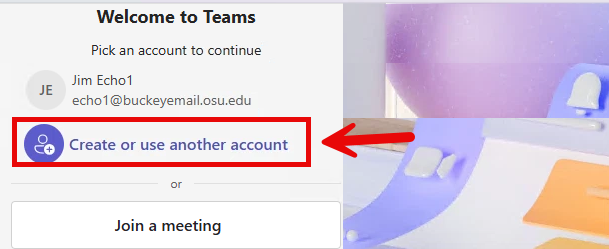
Reopen Teams. You will have the option to select your BuckeyeMail account; do not choose that option
- Click “Create or Use another account”
- Enter your lastname.#@osu.edu email address
- Click “Next”
- Enter your password and click “Sign in”
- Complete BuckeyePass/Duo Multifactor Authentication
- Select “No, this app only” if prompted
Additional Instructions for Mac Users
Some users may have issues with OneDrive or Outlook. If you open Outlook for Mac and are not prompted to sign in, and your mail does not load. Additional steps may also be required if you are unable to sign in to OneDrive or if it displays an error. In both cases, you will need to remove your lastname.#@buckeyemail.osu.edu accont and create a new profile.
Steps for Mac users to create a new profile in Outlook
First, remove your BuckeyeMail account.
- Open Outlook
- In the top menu bar, click “Outlook”
- Select “Settings”
- Under the "Quick Settings" section, click “Accounts”
- Click on your lastname.#@buckeyemail.osu.edu account
- Click on “Manage” in the lower left corner, then select “Remove Account”
- Click Continue to confirm the removal of the account.
Then follow these steps to add your lastname.#@osu.edu account to Outlook.
- Open Outlook
- Go to the top menu bar, click “Outlook,” and select “Settings”
- Under Quick Settings, click “Accounts”
- Click the “+ Add Account” button in the bottom left corner
- Type your lastname.#@osu.edu email address and click “Continue”
- Enter your password and follow the on-screen prompts.
- Complete BuckeyePass/Duo Multifactor Authentication when prompted
Steps for Mac users to create a new profile in OneDrive
First, remove your BuckeyeMail account.
- Click the OneDrive cloud icon, which is located near the clock in the top Menu Bar
- Click the "Help and Settings" icon, which is the ellipsis icon (…)
- Select "Settings" (gear icon)
- Click on "Account" on the left side
- Scroll down and click “Unlink this Mac” then confirm by selecting “Unlink account”
Then follow these steps to add your lastname.#@osu.edu account to OneDrive.
- Open the OneDrive app
- Click the OneDrive cloud icon, which is located in the top menu bar near the clock.
- Click the "Help & Settings" icon, which is the ellipsis icon (…)
- Select "Settings" (the gear icon).
- Click on “Account” on the left side.
- Click on “Add an Account” on the right side
- Type your lastname.#@osu.edu email address and click “Sign In”
- If prompted, select "Work or School " as the account type
- Enter your password and follow the on-screen prompts
- Complete BuckeyePass/Duo Multifactor Authentication when prompted
Additional Instructions for Mobile App Users
Steps to reset Microsoft Teams mobile
- Open Teams
- Sign out of your account
- Sign back into your account with your lastname.#@osu.edu
Steps to reset Office Mobile Apps
- Open the mobile app you want to access (Word, Excel, OneNote, OneDrive, etc.)
- Sign out of your account
- Sign back into your account with your lastname.#@osu.edu
Other Office apps should update automatically after you perform these steps in any one of the apps.
Email Simplification Project Details
This change will simplify email. It benefits you because you will now have:
- One place for important university communications
- No need to juggle multiple email logins
- Clear guidance on which email to use to log in
- Stronger, more consistent security protections
This is part of Ohio State’s broader effort to modernize technology and better protect sensitive information.
Here’s a preview of what may change for you:
- Your login will update to lastname.#@osu.edu for Microsoft 365 and related services
- You may need to log back into apps after your transition
- Files in OneDrive will transfer to your updated account
- Some files or folders may need to be reshared
- Your workstation login profile may change (i.e., web favorites might be reset, blank My Documents folder, etc.)
You’ll receive personalized communications with your specific timeline and any actions you need to take.
Frequently Asked Questions
These FAQs will answer most questions, Content is a work in progress and will be updated as additional details become available.
Is there anything I should do to prepare?
Yes, before your transition, we recommend:
- Cleaning up your email and emptying your Deleted Items folder
- Cleaning up files in OneDrive and emptying the recycle bin
- If you have mailbox rules that forward messages from BuckeyeMail (bmail) to an lastname.#@osu.edu or @osumc.edu address, remove those rules
- Continue checking your email and the project website for updates about your transition date
What should I expect on the day that my account transitions?
On the day your account transitions:
- You will be signed out of apps where you used buckeyemail.osu.edu to sign in, including Outlook, OneDrive, desktop and mobile apps
- After the transition, BuckeyeMail sign‑ins will no longer work and will return an “unknown account” error
- Sign back in to Microsoft 365 apps using lastname.#@osu.edu
- This includes signing in on classroom or lab computers, even if posted instructions reference BuckeyeMail
I signed up for services or mailing lists using my BuckeyeMail address. What should I do?
Email sent to buckeyemail.osu.edu will continue to be delivered to your mailbox.
However, we recommend updating those services to use your lastname.#@osu.edu address going forward.
Students
I am an active student. What do I need to know?
After your transition date:
- You will no longer be able to sign in using buckeyemail.osu.edu
- If you try to sign in with BuckeyeMail, you will receive an “unknown account” error
- Use lastname.#@osu.edu to sign in instead
- All of your email and files will remain available after the transition
I am a graduated student. What do I need to know?
- Graduated students whose two‑year post‑graduation window falls within the project timeframe will not be transitioned unless they return to an active status (student or employee)
- Graduated students whose two‑year post‑graduation window falls outside the project timeframe will transition in the same way as active students
I am a student with an S‑account. What do I need to know?
S‑accounts will continue to be used for students who need separation between academic and university business accounts, such as those who:
- Require a university phone number
- Work in departments like legal, compliance, or similar areas
I applied to Ohio State but decided to attend another university. Why did I receive this email?
If you applied to Ohio State, an account was created as part of that process. There is nothing you need to do. Your account will automatically transition and be deleted after the semester you applied for has concluded.
Employees and Affiliates
Are we keeping the name BuckeyeMail? How should we refer to email in student communications?
We are not keeping the name BuckeyeMail. You can continue to use "BuckeyeMail" in student communications until early in June. We will be sending a general email to students (to all addresses we have on file for each student) during the week of June 15 to ensure all students have been informed. We will begin transitioning students on June 22 - that's when things will be a little tricky, as some students will be transitioned to one account and some will have two until everyone has been moved to one account. We expect to have active students moved to one account by the end of July. Moving forward we will simply refer to "university email," "Ohio State email" or "student email."
I am a university employee (not OSUMC) and also a student or guest. What do I need to know?
Your BuckeyeMail (bmail) mailbox and OneDrive data will be migrated to your @osu.edu account.
I am a medical center employee and also a student. What do I need to know?
Your BuckeyeMail (bmail) mailbox and OneDrive data will be migrated to your lastname.#@osu.edu account.
If you currently forward your @osu.edu email to OSUMC or NCH, messages sent to your BuckeyeMail address will continue to be forwarded there.
If you have set up any Teams meetings using your BuckeyeMail account, the meeting will be cancelled and replaced with a new meeting invitation from your lastname.#@osu.edu.
University Departments
My unit’s instructions for students reference BuckeyeMail. What should we do?
You should plan to update those materials after your unit’s transition date. Because the transition will occur over several months, we do not recommend removing all BuckeyeMail references until the project is complete.
My unit sends email communications to students using BuckeyeMail addresses. What do we need to change?
- All current and future students will continue to be assigned buckeyemail.osu.edu addresses
- Email sent to BuckeyeMail addresses will continue to be delivered
- Units are encouraged to review and update communications to use @osu.edu addresses when possible
- BuckeyeMail addresses will remain in place for the foreseeable future; any long‑term plans for removal will be communicated later