Login at to Ohio State's Workday portal using your OSU Name.# account.
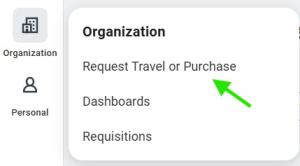
Select the Request Travel or Purchase in the Organization menu.
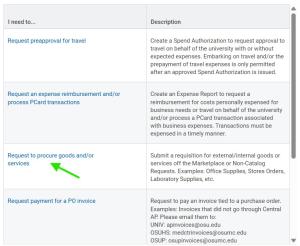
Select the Request to procure goods and/or Services option.
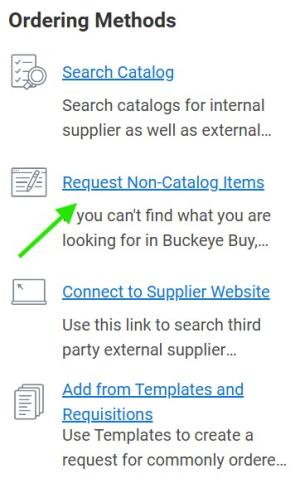
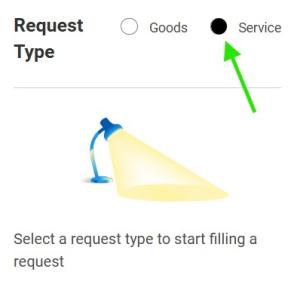
In the Ordering Methods box, choose the Request Non-Catalog Items link, followed by the service radio button.
In the next section:
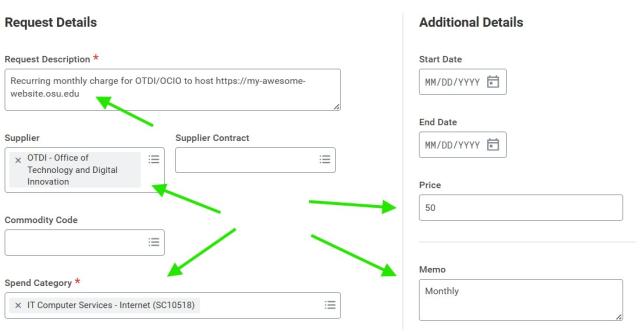
- Enter a Request Description for your purchase. Something like: “Recurring monthly charge for OTDI/OCIO to host https://my-awesome-website.osu.edu”, changing the underlined portion to reflect the URL of your site.
- Set the Supplier to “OTDI – Office of Technology and Digital Innovation”.
- Set the Spend Category of, “IT Computer Services - Internet” (SC10518)”
- Set a monthly Price (currently $50 per month)
- Set the Memo to reflect "Monthly"
Click the Add to Cart Button

. To access your cart, select the cart icon

in the upper right-hand corner of your screen.
When you’re shopping is complete, review your cart for completeness and click the Checkout button

. This will throw an error, but it’s just a reminder to add a 'Business Purpose' for future auditors.
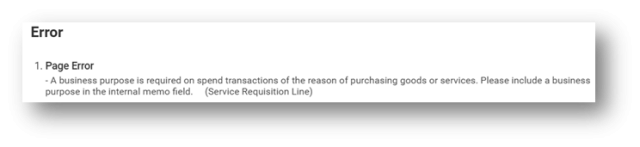
Complete the Internal Memo field, entering a well-defined, plain English business purpose for your requisition.
Something like, “A Hosting Service for a website to disseminate our research to the Public, recruit new students, and collaborate with other researchers.”, changing the underlined portion as necessary.
Every expenditure must be supported by a documented ‘Business Purpose’. A business purpose should be written so an individual unfamiliar with the organization’s operation (aka: An Auditor) can understand why the transaction occurred and how it benefits the University.
Once the business purpose has been defined, click the Submit button

.
For more details on completing a requisition in Workday please see Create a Requisition to Procure Goods and Services.