The GMS Service is an Enterprise Access Management System used for highly distributed, heterogeneous environments common to universities. Operating a centralized access management system that supports distributed IT is ‘Best Practice’ and reduces overall risk. This document explains how to use the OSU GMS service in your OTDI Web Hosted sites.
Definitions for this document
WebSSO: The Web Single Sign-On Service offers a standard set of authentication and authorization services to web-based applications. It allows web sites to authenticate users by means of OTDI-managed “name.#” accounts and provides access to useful institutional data about users at the time of login.
GMS Service Account: The OSU Group Management Service is used ‘as-is’ and based on an open-source project named "Grouper". OSU user credentials cannot be used to access GMS's Web Services, so you must have a GMS service account before attempting to use the GMS with WebSSO.
EntityID: The Shibboleth EntityID is an automatically generated string built from each Primary & Secondary URLs registered within your Webhosting Dashboard. It resembles a URL and gets automatically added to Web Hosting’s metadata configuration for Shibboleth when you add a URL in the dashboard.
SiteID: The OTDI Web Hosting SiteID is the name of your Web Hosted Account which may (or may not) match your site’s Primary URL. For example, https://www.osu.edu is The University’s main web address, but their SiteID is ‘osumain’. This name can be found at the top of your Dashboard, once you login.
Authentication: Authentication is the process used to verify a user's identity. (Are you who you say you are?) Authentication is a prerequisite to authorization.
Authorization: Authorization is the process used to determine the user's level of access, granting or denying entrance to a resource based on that users’ level. (Are you allowed in here?) Authentication is a prerequisite to authorization.
Tell OTDI Web Hosting you want to use GMS for Authorization
In your OTDI Web Hosting Dashboard, under the Server Options section, choose:
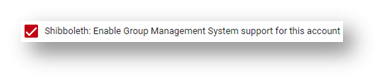
Save your changes
Request the Creation of GMS Group, Folder, and Authorization Entities
Create a ServiceNow request with the IT Security Services Group.
They will need to know:
GMS interface:
- WebSSO(required)
WebSSO EntityID:
- https://[your_primary_URL]/hostedsp(required)
- https://[your_secondary_URL]/hostedsp(optional)
- https://[your_tertiary_URL]/hostedsp(optional)
You must list an EntityID for each URL you want to use GMS with, so if your Production, Development & Test environments all need GMS Authorization, it’s recommended you create a ‘Main’ Group matching your SiteID and a ‘Subgroup’ for each environment (Prod, Dev, & Test). Please note your need for this in the ‘other details’ field in the request form. Once the request is complete, login to Group Management Services to setup the actual entitlements.
This next part is not an attempt to specify exactly how your entitlements should be setup, as your setup must be specific to your application. Rather, it is a primer on the topic. If you have questions, please review the complete GMS knowledgebase, or contact the gms-users@lists.osu.edu for additional assistance.
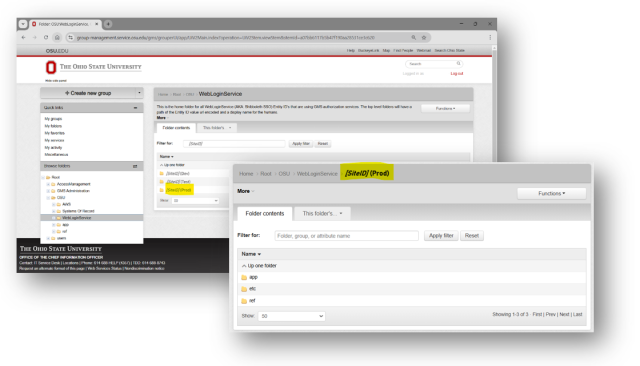
Generally speaking, under each Group [SiteID] you'll need to create entitlements in the /app/ folder, naming them whatever you wish, but keeping these limitations in mind. It's also best practice to create an entry under the /ref/ folder containing the actual user list, and another in the /app/ that's a composite of the mane list in /ref/ minus any names in /etc/DenyUsers.
Edit your sites’ .htaccess file to leverage GMS within Shibboleth Authentication
This will allow your site will use Shibboleth for authentication and GMS for authorization. Edit your site’s .htaccess file to resemble:
AuthType shibboleth
AuthzSendForbiddenOnFailure On
ShibRequireSession on
Require shib-attr entitlement "https://EntityID/hostedsp/SubGroup"