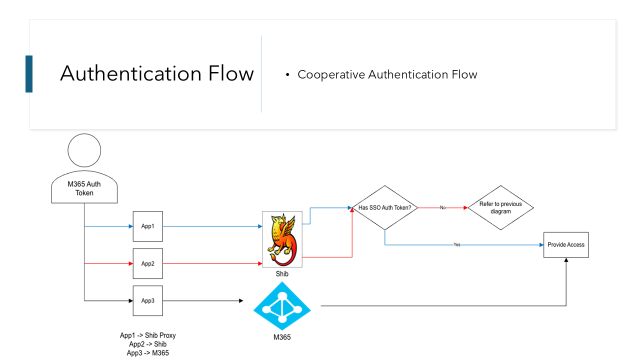
Enables applications that are configured to use Web SSO to utilize either a Shibboleth or Entra ID authentication token. By allowing Web SSO to use tokens from both sources, login prompts are minimized and the authentication experience enhanced. Those that adopt SDES/OneAD/MITS or are using a managed OSUWMC device will experience a true Single Sign On experience by being able to leverage authentication tokens from their Windows sign in.
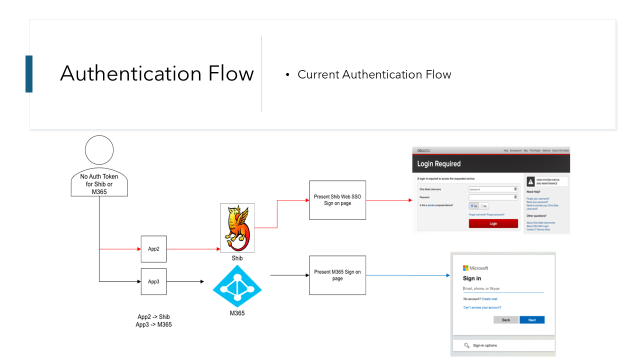
Authentication behavior when a person accesses an authorized application if they are an OSU employee, student or guest:
| Starting Authentication State | App connected to Shibboleth Proxy | App connected to Shibboleth | App connected to M365 |
|---|---|---|---|
| Not Authenticated | M365 Login Prompt | Shibboleth Login Prompt | M365 Login Prompt |
| Authenticated to Shibboleth | No prompt, allowed to access | No prompt, allowed to access | M365 Login Prompt |
| Authenticated to M365 | No prompt, allowed to access | Shibboleth Login Prompt | No prompt, allowed to access |
| Authenticate to SDES/OneAD/MITS or OSUWMC managed device | No prompt, allowed to access | Shibboleth Login Prompt | No prompt, allowed to access |
What about a Medical Center person? It works the same! OSUWMC Person uses their OSUWMC M365 authentication token.
Additional Resources
Cooperative Authentication FAQ
Login Experience
To see what the user will experience in an environment enabled for Cooperative Authentication please see: