The Ohio State Storage Directory is designed to help you find data storage solutions to meet your needs. Available storage options will display after answering a few simple questions about your data.
Using the Storage Directory
Navigate to the Ohio State Storage Directory.
Filter the available storage options to display only those which will meet your needs. Under the Describe your data heading, review and answer as many of the six questions as possible. Note that the more questions you answer, the better the filter results will be. Select the Clear Answers button at any point to reset your criteria.
- Who is allowed to use this storage offering?
- How will the data be accessed?
- Who will need access to the data?
- What is the highest data security classification required? Note: To determine the data security classification of your data elements, review the IDP Calculator.
- How much space will be required?
- What is the data/s primary purpose?
Available storage options which meet your criteria will be displayed. Select any number of available options you want to compare. You may also select the Select All button if you wish to compare all available storage options which meet your criteria.
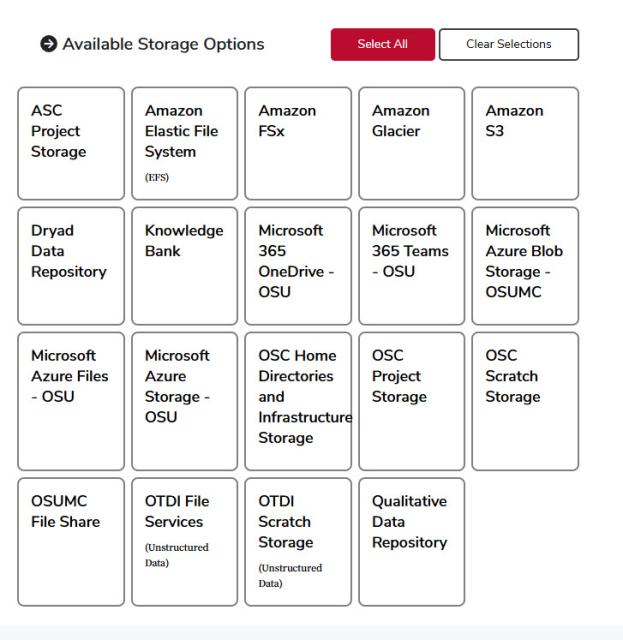
Select the Compare Results button. Information on selected storage options will be displayed at the bottom of the page, including a brief description, performance, data regulation, price, protection, example use, how to request, open notes, and contact information.
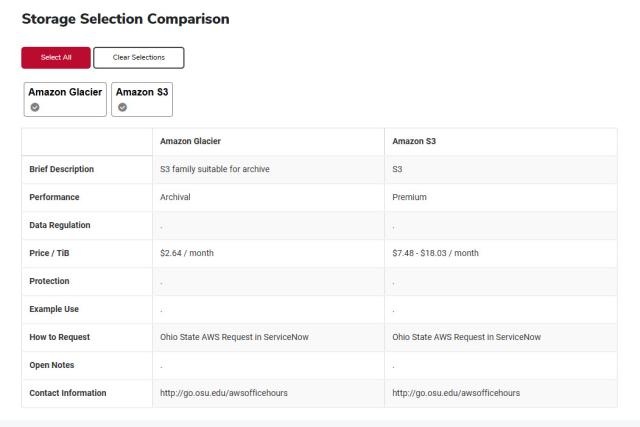
Select the Clear Selections button if you wish to compare different software options.
Help
For assistance with the Storage Directory, please contact the IT Service Desk.