Launch Cisco AnyConnect Security Mobility Client from Start Menu.

Enter vpn.service.osu.edu if not already present.
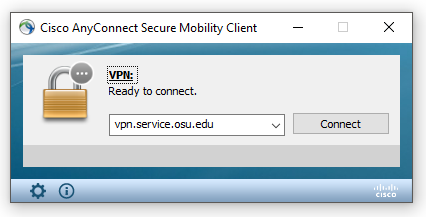
Click Connect
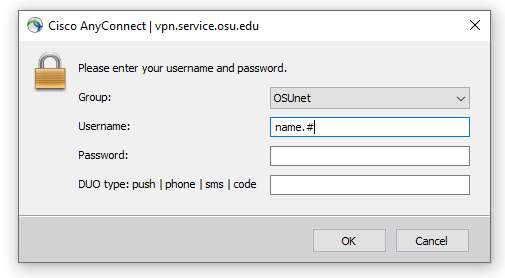
When prompted select appropriate group and click OK:
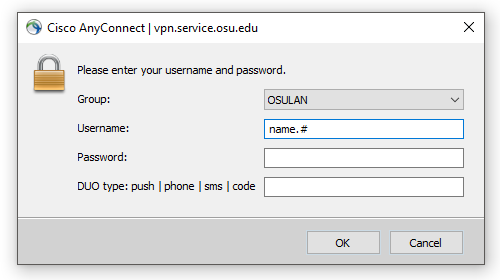
OSULan
Use this profile to access OTDI/MITS resources (file shares) when remote from a University location.
- This uses name.#, Password, and DUO Token to connect.
- Access is available to OTDI/MITS faculty/staff.(BCD group: BCD_RA_VPN_OSULAN)
- Guests accounts will need to request access.
- OTDI and ASCTech supported endpoints only
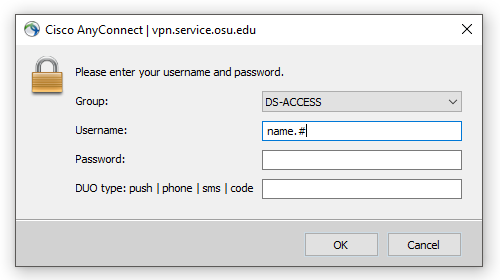
DS-ACCESS
Use this profile to access OTDI/MITS supported Databases (ODS, Redshift, DW, CS, FN, HR)
- This uses name.#, Password, and DUO Token to connect.
- Access is available upon request. (BCD group: BCD_RA_VPN_DSACCESS)
- University supported/owned endpoints only
OSUnet
Use this profile to access campus resources that can only be accessed from University network address space.
- This uses name.#, Password, and DUO Token to connect.
- Access is available via most user affiliation (Faculty, Staff, Students, Guests).
- Personal Endpoints
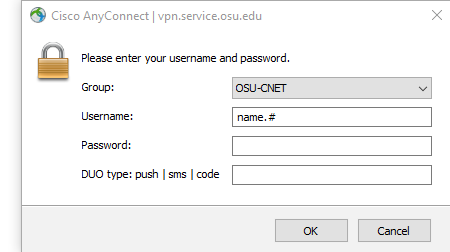
OSU-CNET
- This uses name.#, Password, and DUO Token to connect.
- Access is available to Managed Network Customers only. (BCD group: BCD_RA_VPN_OSUCNET)
- University supported/owned endpoints only