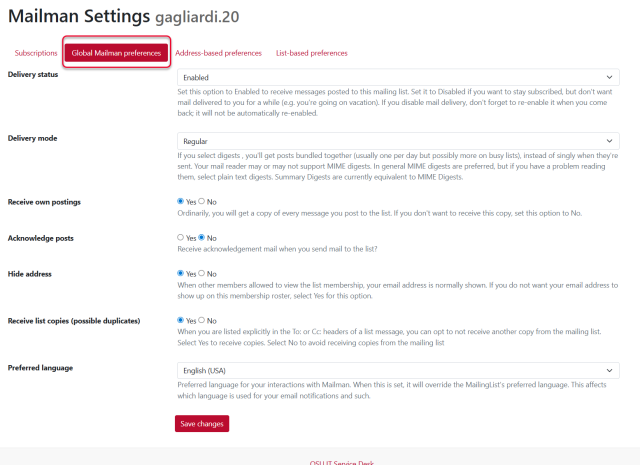
Once logged into Mailman select Member at the top. This will display all lists that the logged in user is already a member of. Members of a mailing list have certain tasks that they can perform to manage their participation in the mailing list. Select the name of the mailing list to access the list-based preferences.
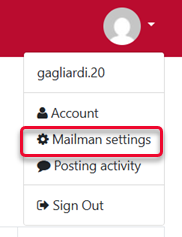
The Subscriptions link at the top of the screen will show all the lists that the logged in user is subscribed to. Alternatively, the same information can be found using the action menu in the upper right-hand corner of the Mailman interface and selecting Mailman Settings.
The settings that can be modified, and what the modifications will do, can be reviewed at Mailing List Settings for Subscribers.
The settings available are:
- Delivery status
- Delivery mode
- Receive your own postings
- Acknowledge posts
- Hide address
- Avoid duplicates
- Preferred Language
Once the settings have been changed, do not forget to click Save changes at the bottom to save the changes that have been made.
List Based Preferences
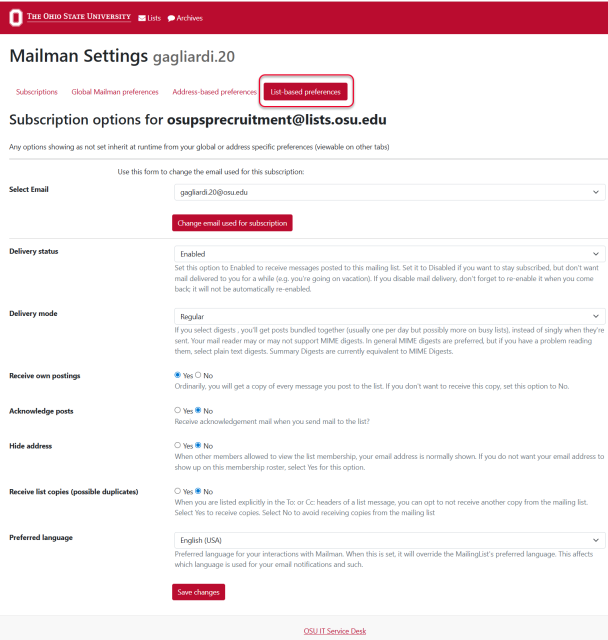
After you select the list, by default the List based preferences option is selected at the top of the Mailman interface. These are settings specifically for this selected list.
Addressed Based Settings
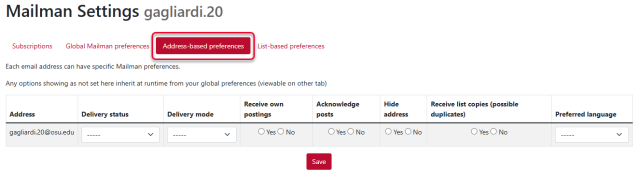
In the Mailman settings window selecting Global Mailman preferences will open the settings for the Mailman account of the logged in user. The preferences changed here change the settings for all lists that pertain to the email account logged into Mailman.
Global Mailman Settings
In the Mailman settings window selecting Global Mailman preferences will open the settings for the Mailman account of the logged in user. These settings pertain to ALL lists and all email addresses of the logged in user.