How to Use the IDP Calculator

Use the results of the IDP Calculator to determine a data element’s classification, as well as how institutional data may be used and shared, either individually or in combination with other data elements.

  1. Open the IDP calculator.

    the IDP calculator
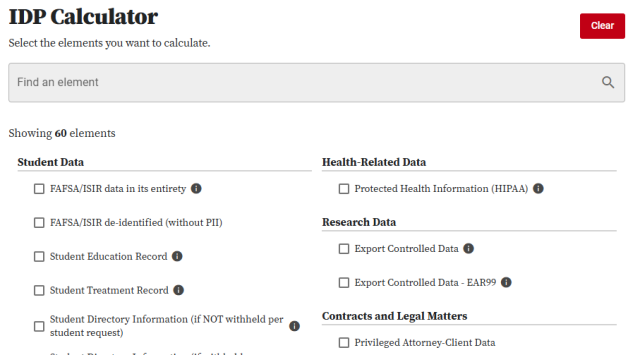
  2. Type or select one or more data elements.

    the IDP calculator with two letters typed in the search box and checkboxes for individual elements below
  3. Review the results. 


    Helpful Note:

    Results will update dynamically as you change your selections in the IDP calculator.

    1. Review the security level. Click the down arrow 

      down arrow

       on any data element to review additional information about the data element.
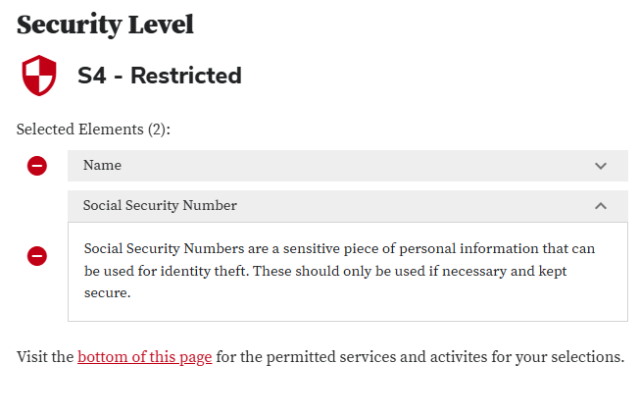
      the IDP calculators security level results with one element expanded
    2. Review the permitted services and activities.
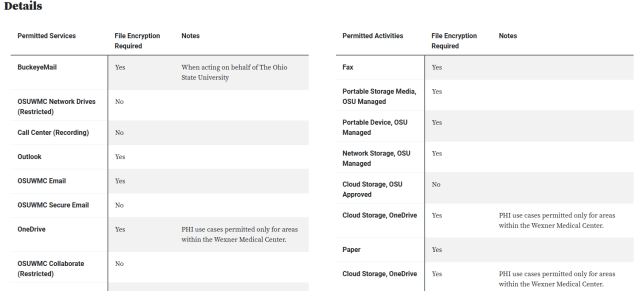
      the IDP calculators permitted activities and services results